
- Struggling With Slow WiFi? Your Router's Range Could Be the Problem
- What Is Router Range?
- Why Is My Router Range So Poor?
- 10 Ways to Improve Your Router Range
- 1. Move Your Router to a Central Location
- 2. Keep Your Router Away From Interference
- 3. Upgrade to a Modern Router
- 4. Switch to WiFi 6 or WiFi 7
- 5. Use a WiFi Access Point
- 6. Update Your Router Firmware
- 7. Change Your WiFi Channel
- 8. Reduce Network Congestion
- 9. Consider Wired Connections for High-Bandwidth Devices
- 10. Use the Right WiFi Band for Your Devices
- Signs It's Time to Replace Your Router
- Home vs Business Router Range: What's the Difference?
- Frequently Asked Questions
Struggling With Slow WiFi? Your Router’s Range Could Be the Problem
In todays world, there are few things more frustrating than problematic WiFi.
Whether you’re trying to enjoy a good film, join an important video call, or just browse the internet at a reasonable speed, your poor WiFi strength can quickly become a daily irritance that can leave you nothing shy of irate.
If you’ve ever experienced:
- Needing to be sat in a specific place to take video calls
- Slow internet speeds despite paying for fast broadband
- Buffering or an endless loading circle while trying to stream something
- Constantly having to reconnect your device
…you’re not alone.
In many cases, when your wifi strength depends on which room you’re in, the problem is your router’s range.
Luckly improving your router range doesn’t always mean buying a brand-new router. Often, a few simple changes can improve your wireless coverage and give you a faster, more reliable connection throughout your property or business.
In this guide, we’ll explain what affects router range, why your WiFi signal weakens, and the best ways to extend your wireless coverage.
What Is Router Range?
Router range refers to the distance your wireless router can reliably transmit a WiFi signal.
The further you move away from your router, the weaker the signal becomes. Walls, furniture, electronic devices, and even neighbouring WiFi networks can reduce your router’s effective range.
If your router doesn’t provide stable coverage across your entire property, you’ll know about it.
Likely from a combination of the issues listed above.
Why Is My Router Range So Poor?
Many people assume their broadband provider is responsible for weak WiFi.
In reality, several factors can affect your router’s range:
Poor Router Placement
Where your router sits has a huge impact on signal strength.
Routers hidden inside cupboards, behind televisions, or tucked into corners often struggle to distribute WiFi evenly.
Thick Walls and Building Materials
Brick, concrete, metal, and insulated walls can all weaken wireless signals.
Older buildings and larger properties often experience more WiFi dead spots because the signal has to travel through more obstacles.
Too Many Connected Devices
Modern homes and businesses have more devices connected to the internet than ever before.
Laptops, smartphones, tablets, smart TVs, security cameras, gaming consoles, printers, and smart home devices all compete for bandwidth.
An overloaded router can struggle to deliver consistent performance across every device.
Outdated Router Technology
If your router is several years old, it may not support the latest WiFi standards.
Older routers typically offer shorter range, slower speeds, and reduced capacity compared to modern WiFi 6 or WiFi 7 devices.
10 Ways to Improve Your Router Range
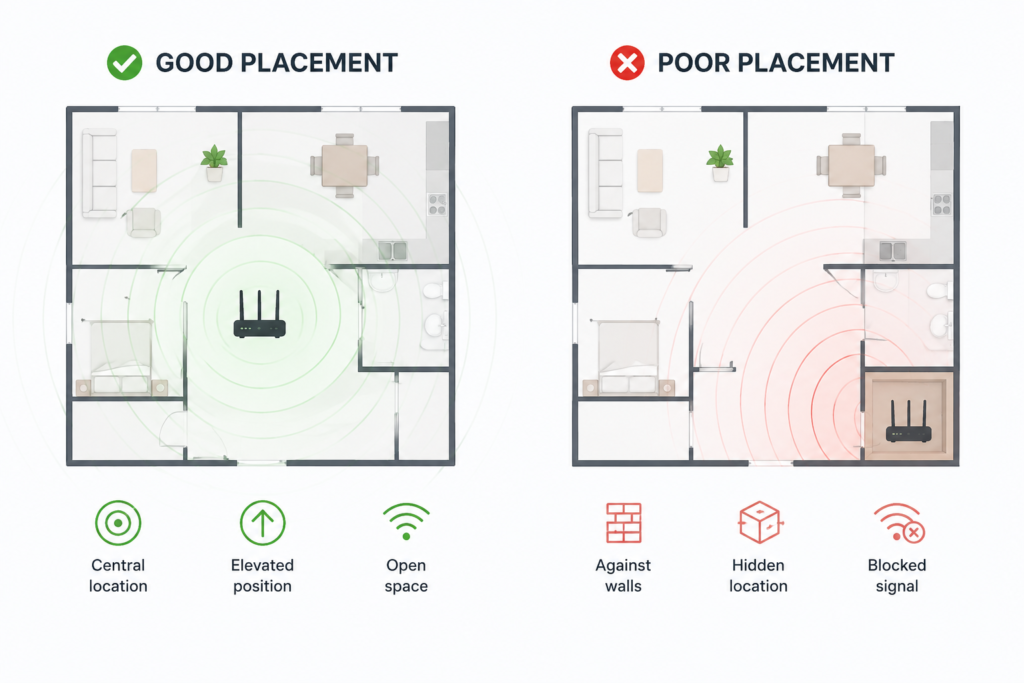
1. Move Your Router to a Central Location
One of the easiest ways to improve router range is to relocate your router.
Ideally, position it:
- Near the centre of your property
- On a shelf or elevated surface
- Away from walls
- Away from large metal objects
- In an open area
Think of your router like a light bulb where the light spreads outward, a router’s wifi signal works the same way.
Placing your router in the middle of your home or office helps distribute the signal more evenly.
2. Keep Your Router Away From Interference
Many household devices interfere with WiFi signals.
Common culprits include:
- Microwaves
- Cordless phones
- Baby monitors
- Bluetooth devices
- Wireless speakers
- Large televisions
Keeping your router away from these devices can noticeably improve performance.
3. Upgrade to a Modern Router
Technology has moved on significantly over the last few years.
Modern routers offer:
- Greater WiFi range
- Faster speeds
- Better device handling
- Improved security
- Enhanced reliability
If you’re still using a router supplied by your internet provider several years ago, you may need to start looking at whether a new router could be best for you.
4. Switch to WiFi 6 or WiFi 7
The latest WiFi standards are designed to handle today’s ultra-connected homes and businesses.
Benefits include:
- Better coverage
- Higher speeds
- Lower latency (delay in data transmission between two points)
- Improved performance with multiple devices
- Greater efficiency
For busy households or growing businesses, upgrading to WiFi 6 or WiFi 7 can significantly improve overall network performance.
5. Use a WiFi Access Point
If your property is large or has multiple floors, even a top tier router may never provide full coverage.
Access Points or Mesh WiFi systems use multiple devices that are placed strategically to amplify the routers signal and create one seamless network system.
Instead of switching between different WiFi networks, your devices automatically connect to the strongest signal as you move around the building.
This eliminates many common WiFi dead zones.
6. Update Your Router Firmware
Manufacturers regularly release firmware updates that improve:
- Stability
- Security
- Performance
- Signal optimisation
Keeping your router updated helps ensure it’s operating at its best.
This is automatically done with a managed broadband plan.
7. Change Your WiFi Channel
In busy residential areas, neighbouring WiFi networks can compete for the same wireless channels.
Switching to a less congested channel can reduce interference and improve performance.
Many modern routers automatically select the best channel, but manual optimisation can sometimes produce even better results. These setting are accessible through your broadband provider’s management platform.
8. Reduce Network Congestion
Every connected device uses part of your available bandwidth.
Disconnect devices you’re no longer using and prioritise critical devices where possible.
Some routers also include Quality of Service settings, allowing you to prioritise activities like video conferencing or VoIP calls.
9. Consider Wired Connections for High-Bandwidth Devices
Not every device needs to use WiFi.
Gaming consoles, desktop computers, smart TVs, and network storage devices often perform better when connected via Ethernet.
This frees up wireless capacity for devices that genuinely need wireless connection.
As well as providing secure and quality performance straight into any devices using an Ethernet cable!
10. Use the Right WiFi Band for Your Devices
Most modern routers broadcast on both 2.4GHz and 5GHz frequencies.
Understanding the difference can dramatically improve your WiFi experience.
- 2.4GHz offers a longer range and better performance through walls, making it ideal for smart home devices and rooms further from the router.
- 5GHz provides faster speeds but has a shorter range, making it better suited for devices closer to the router, such as laptops, gaming consoles, and streaming devices.
Many modern routers automatically steer devices to the best band, but if yours doesn’t, manually connecting devices to the appropriate frequency can improve performance and reduce congestion.
Signs It’s Time to Replace Your Router
Sometimes no amount of optimisation can overcome ageing hardware.
You should consider upgrading if:
- Your router is over five years old
- You’re experiencing frequent disconnections
- WiFi speeds are much slower than your broadband package
- You regularly lose signal in specific rooms
- Your network struggles with multiple connected devices
- Your router doesn’t support WiFi 6 or newer standards
Investing in a modern router can improve not only your WiFi range but also your overall online experience.
But before you do that, give as a call to book in your business for a free telecoms audit.
We’ll make sure there are no underlying problems setting your wifi out of whack before you spend unneccesary money on new tech.
Home vs Business Router Range: What’s the Difference?
While home routers are suitable for everyday internet use, businesses often require more robust networking solutions.
Commercial environments typically have:
- More connected users
- Larger buildings
- Higher bandwidth demands
- More security requirements
- Continuous uptime expectations
Business-grade routers and managed WiFi solutions are designed to deliver consistent coverage, greater reliability, and easier scalability.
If your business relies on cloud applications, VoIP phone systems, or hybrid working, investing in professional networking equipment can significantly improve uptime for these competing devices.
Frequently Asked Questions
How far should a WiFi router reach?
The range of a WiFi router depends on the model, frequency band, and obstacles in your property. Most standard home routers can provide reliable coverage across a typical house, but thick walls, multiple floors, and interference from other devices can significantly reduce the effective range.
Does putting your router higher improve WiFi?
Yes. Placing your router on a shelf or other elevated surface helps the WiFi signal spread more evenly throughout your home or office. Avoid placing it on the floor or inside cupboards, as this can reduce signal strength and create dead zones.
What’s the difference between WiFi speed and WiFi range?
WiFi speed refers to how quickly data is transferred between your device and the router, while WiFi range is the distance your router can reliably broadcast its signal. You can have fast broadband but still experience poor performance if you’re outside your router’s effective range.
How often should I replace my router?
Most routers should be replaced every 4–6 years, depending on their performance and the technology they support. If your router doesn’t support newer standards such as WiFi 6 or WiFi 7, or you’re experiencing regular connectivity issues, upgrading could improve both speed and coverage.